Fundamental Requirements
Complete guide to creating templates and/or automated documents with HTML, JSON, and the document generation SDK.
Every automation requires exactly 3 files:
| File | Description |
|---|---|
| Mask HTML | The HTML that the user sees while completing the form through the SDK |
| Complete HTML | HTML to generate the final PDF, includes spaces for signatures |
| JSON Object | Controls the behavior, defines signers and questions |
General Flow
The process always starts with building the complete HTML. This document must contain editable spaces where the user enters information. This HTML will depend on the variables registered in the JSON where each question has an identifier.
For example:
- HTML:
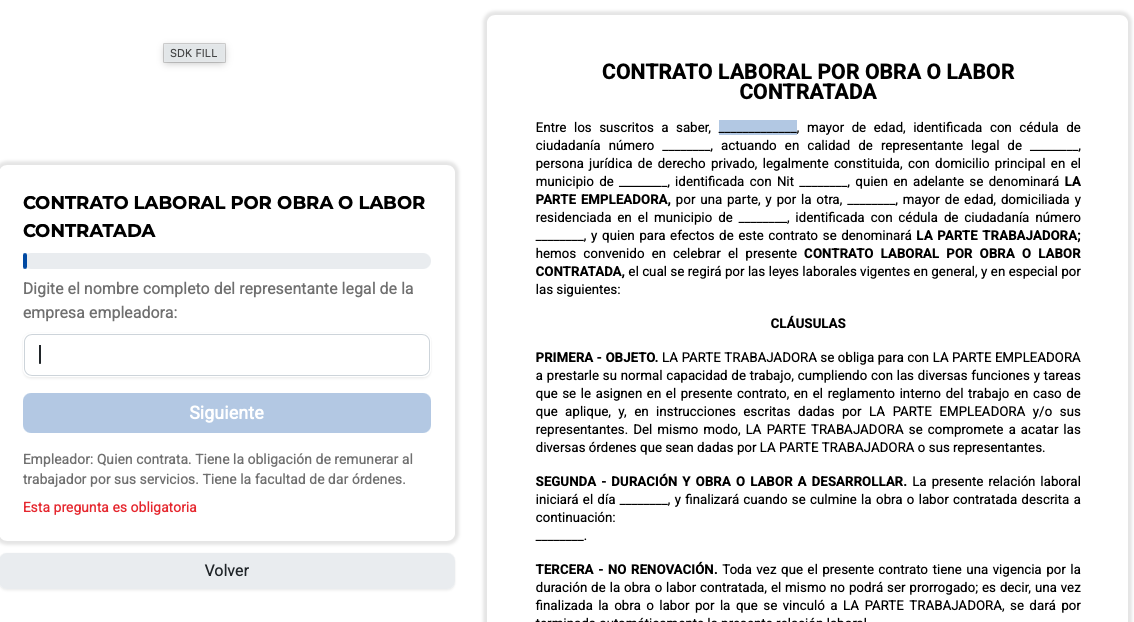
<p>Description: <span name="question_1">___________</span></p>
- Question in JSON:
[
  ...,
{
  "name": "question_1",
  "description": "Enter the full name of the legal representative of the employing company",
  "type": "text"
},
  ...
]
- What the user finally sees:
Configuration
- To start generating the HTML files, learn everything about their creation in HTML Configuration.
- To start generating the JSON file, see the full reference in JSON Configuration — this covers all 17 question types, validations, and conditional logic.
- For templates that need to validate a code or look up pre-filled data from your own service, see Request Type.
Tips and Best Practices
- Consistent naming: Use descriptive
snake_casefor questions:buyer_name,seller_email. - Match field types to semantics: use
identificationfor signer documents (nottextornumber),nitfor Colombian tax IDs,currencyfor money,emailfor emails. - Early validation: mark critical questions in the
signarray. - Leverage validations: infer
subYears(age),maxlength,regex,min/maxfrom the document's own requirements. See Validation Properties. - Signer convention: never mix
idandnamefor the same signer in the Complete HTML. If a signature appears in multiple places, usenameconsistently — see Signature Placement. - Automatic fields: add
<span name="signDate">where the signing date should appear and<span name="signComplete" hidden>for post-sign confirmations. See Automatic Fields on Sign Finish. - Multiple identifications: use
|insignatureProfile.identificationto support several document types for one signer. - Rendering constraints: the Complete HTML is rendered with PhantomJS — no flexbox, CSS Grid, or CSS variables. See Renderer Constraints.
- Testing: verify that each
clausulaoption hides/shows correctly and that the default option matches thevaluein config.
Validation Checklist
Before deploying your automation, verify:
- You have the 3 files (Mask HTML, Complete HTML, JSON).
- Each question in JSON has
name,description, andtype. - Every
namein HTML matches a question in JSON — and vice versa. -
clausulaquestions have one<span name="{name}_{value}">per option in the HTML. - The default
valuein aclausulaconfig matches the span without thehiddenattribute. - Questions with
prereqreference questions of typeclausula. - Every signer in
signatureProfilehas its<div id="X">or<div name="X">in the Complete HTML (never both). - Questions in
signreference real question names. - Signer identification questions use
type: "identification", NITs usetype: "nit". -
checkquestions use a flatvalues: [...]array (notoptions). - The HTML does not use
display: flex, CSS Grid, or CSS variables. - UTF-8 characters (
ñ,á) are written directly, not as HTML entities. - If using
preBuild: true, you includedpreBuildData.
Complete Integrated Example
Complete JSON
{
  "name": "Purchase-Sale Contract",
  "price": 15000,
  "preBuild": false,
  "username": "my_company",
  "sign": ["buyer_name", "buyer_email"],
  "config": [
    {
      "name": "buyer_name",
      "description": "Enter your full name",
      "type": "name"
    },
    {
      "name": "identification_type",
      "description": "Select your identification type",
      "type": "clausula",
      "value": "id_card",
      "options": [
        { "name": "National ID Card", "value": "id_card" },
        { "name": "Foreign ID Card", "value": "foreign_id" }
      ]
    },
    {
      "name": "id_card_number",
      "description": "Enter your identification number",
      "type": "number",
      "prereq": [{ "k": "identification_type", "v": "id_card" }]
    },
    {
      "name": "foreign_id_number",
      "description": "Enter your foreign ID number",
      "type": "number",
      "prereq": [{ "k": "identification_type", "v": "foreign_id" }]
    },
    {
      "name": "buyer_email",
      "description": "Enter your email address",
      "type": "email"
    },
    {
      "name": "buyer_phone",
      "description": "Enter your phone number",
      "type": "phone"
    },
    {
      "name": "transaction_value",
      "description": "Enter the total purchase value",
      "type": "currency"
    },
    {
      "name": "transaction_date",
      "description": "Select the transaction date",
      "type": "date"
    },
    {
      "name": "product_description",
      "description": "Briefly describe the product",
      "type": "text"
    }
  ],
  "signatureProfile": [
    {
      "name": "buyer_name",
      "identification": "id_card_number|foreign_id_number",
      "email": "buyer_email",
      "phone": "buyer_phone",
      "type": "buyer"
    }
  ]
}
Mask HTML
<!DOCTYPE html>
<html lang="en">
  <head>
    <meta charset="UTF-8" />
    <title>Purchase-Sale Contract</title>
    <style>
      body {
        font-family: Arial, sans-serif;
        max-width: 800px;
        margin: 40px auto;
        padding: 20px;
      }
      .section {
        margin-bottom: 30px;
        padding: 15px;
        border: 1px solid #ddd;
        border-radius: 5px;
      }
      h1 {
        text-align: center;
        color: #333;
      }
      label {
        font-weight: bold;
        display: block;
        margin-bottom: 5px;
      }
      span {
        border-bottom: 1px solid #000;
        min-width: 200px;
        display: inline-block;
        padding: 5px;
      }
    </style>
  </head>
  <body>
    <h1>Purchase-Sale Contract</h1>

    <div class="section">
      <h2>Buyer Information</h2>
      <label>Full Name:</label>
      <span name="buyer_name">___________________</span>

      <label>Identification Type:</label>
      <span name="identification_type_id_card">ID Card</span>
      <span name="identification_type_foreign_id" hidden>Foreign ID</span>

      <label>Identification Number:</label>
      <span name="id_card_number">___________________</span>
      <span name="foreign_id_number" hidden>___________________</span>

      <label>Email Address:</label>
      <span name="buyer_email">___________________</span>

      <label>Contact Phone:</label>
      <span name="buyer_phone">___________________</span>
    </div>

    <div class="section">
      <h2>Transaction Information</h2>
      <label>Product Description:</label>
      <span name="product_description">___________________</span>

      <label>Total Value:</label>
      <span name="transaction_value">___________________</span>

      <label>Transaction Date:</label>
      <span name="transaction_date">___________________</span>
    </div>

    <p style="margin-top: 50px; text-align: center;">Buyer's Signature: ______________________</p>
  </body>
</html>
Complete HTML
<!DOCTYPE html>
<html lang="en">
  <head>
    <meta charset="UTF-8" />
    <title>Purchase-Sale Contract</title>
    <style>
      body {
        font-family: Arial, sans-serif;
        max-width: 800px;
        margin: 40px auto;
        padding: 20px;
      }
      .sign-margin {
        min-height: 100px;
        margin-top: 30px;
        page-break-inside: avoid;
      }
    </style>
  </head>
  <body>
    <h1>Purchase-Sale Contract</h1>

    <h2>Buyer Information</h2>
    <p>
      Name: <strong><span name="buyer_name">___________________</span></strong>
    </p>
    <p>
      Identification:
      <strong
        ><span name="id_card_number">___________________</span
        ><span name="foreign_id_number" hidden>___________________</span></strong
      >
    </p>
    <p>
      Email: <strong><span name="buyer_email">___________________</span></strong>
    </p>

    <h2>Transaction Information</h2>
    <p>
      Product: <strong><span name="product_description">___________________</span></strong>
    </p>
    <p>
      Value: <strong><span name="transaction_value">___________________</span></strong>
    </p>
    <p>
      Date: <strong><span name="transaction_date">___________________</span></strong>
    </p>

    <h2>Signature</h2>
    <div id="buyer" class="sign-margin"></div>
  </body>
</html>